Can explain testing
Testing: Operating a system or component under specified conditions, observing or recording the results, and making an evaluation of some aspect of the system or component. –- source: IEEE
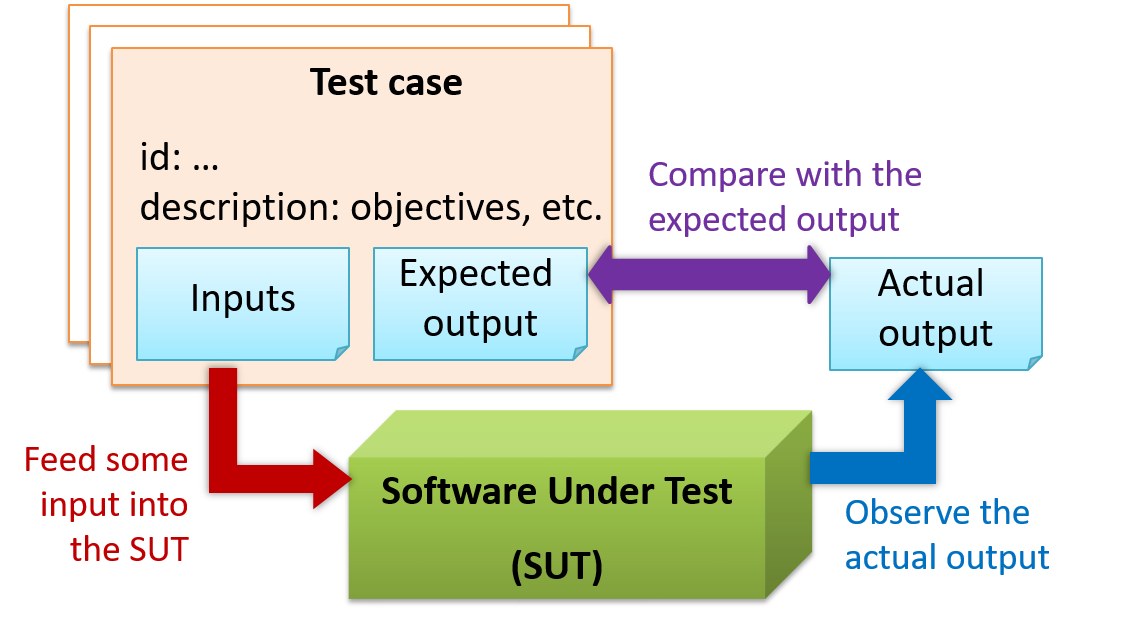
When testing, we execute a set of test cases. A test case specifies how to perform a test. At a minimum, it specifies the input to the software under test (SUT) and the expected behavior.
Example: A minimal test case for testing a browser:
- Input – Start the browser using a blank page (vertical scrollbar disabled). Then, load
longfile.htmllocated in thetest datafolder. - Expected behavior – The scrollbar should be automatically enabled upon loading
longfile.html.
Test cases can be determined based on the specification, reviewing similar existing systems, or comparing to the past behavior of the SUT.
- A unique identifier : e.g. TC0034-a
- A descriptive name: e.g. vertical scrollbar activation for long web pages
- Objectives: e.g. to check whether the vertical scrollbar is correctly activated when a long web page is loaded to the browser
- Classification information: e.g. priority - medium, category - UI features
- Cleanup, if any: e.g. empty the browser cache.
For each test case we do the following:
- Feed the input to the SUT
- Observe the actual output
- Compare actual output with the expected output
A test case failure is a mismatch between the expected behavior and the actual behavior. A failure indicates a potential defect (or a bug), unless the error is in the test case itself.
Example: In the browser example above, a test case failure is implied if the scrollbar remains disabled after loading longfile.html. The defect/bug
causing that failure could be an uninitialized variable.
Here is another definition of testing:
Software testing consists of the dynamic verification that a program provides expected behaviors on a finite set of test cases, suitably selected from the usually infinite execution domain. -– source: Software Engineering Book of Knowledge V3
Some things to note (indicated by keywords in the above definition):
- Dynamic: Testing involves executing the software. It is not by examining the code statically.
- Finite: In most non-trivial cases there are potentially infinite test scenarios but resource constraints dictate that we can test only a finite number of scenarios.
- Selected: In most cases it is not possible to test all scenarios. That means we need to select what scenarios to test.
- Expected: Testing requires some knowledge of how the software is expected to behave.
Exercises
Relate testing, test cases, failure, and defect
Explain how the concepts of testing, test case, test failure, and defect are related to each other.
Can explain testability
Testability is an indication of how easy it is to test an SUT. As testability depends a lot on the design and implementation. You should try to increase the testability when you design and implement a software. The higher the testability, the easier it is to achieve a better quality software.
Can explain unit testing
Unit testing: testing individual units (methods, classes, subsystems, ...) to ensure each piece works correctly
In OOP code, it is common to write one or more unit tests for each public method of a class.
Here are the code skeletons for a Foo class containing two methods and a FooTest class that contains unit tests for those two methods.
class Foo{ String read(){ //... } void write(String input){ //... } }class FooTest{ @Test void read(){ //a unit test for Foo#read() method } @Test void write_emptyInput_exceptionThrown(){ //a unit tests for Foo#write(String) method } @Test void write_normalInput_writtenCorrectly(){ //another unit tests for Foo#write(String) method }}import unittestclass Foo: def read(self): # ... def write(self, input): # ...class FooTest(unittest.TestCase): def test_read(sefl): # a unit test for read() method def test_write_emptyIntput_ignored(self): # a unit tests for write(string) method def test_write_normalInput_writtenCorrectly(self): # another unit tests for write(string) methodResources
Side readings:
- [Web article] The three pillars of unit testing - A short article about what makes a good unit test.
- Learning from Apple’s #gotofail Security Bug - How unit testing (and other good coding practices) could have prevented a major security bug.
Can use stubs to isolate an SUT from its dependencies
A proper unit test requires the unit to be tested in isolation so that bugs in the
If a Logic class depends on a Storage class, unit testing the Logic class requires isolating the Logic class from the
Storage class.
Stubs can isolate the
Stub: A stub has the same interface as the component it replaces, but its implementation is so simple that it is unlikely to have any bugs. It mimics the responses of the component, but only for the a limited set of predetermined inputs. That is, it does not know how to respond to any other inputs. Typically, these mimicked responses are hard-coded in the stub rather than computed or retrieved from elsewhere, e.g. from a database.
Consider the code below:
class Logic { Storage s; Logic(Storage s) { this.s = s; } String getName(int index) { return "Name: " + s.getName(index); }}interface Storage { String getName(int index);}class DatabaseStorage implements Storage { @Override public String getName(int index) { return readValueFromDatabase(index); } private String readValueFromDatabase(int index) { // retrieve name from the database }}Normally, you would use the Logic class as follows (note how the Logic object depends on a DatabaseStorage object to perform the getName() operation):
Logic logic = new Logic(new DatabaseStorage());String name = logic.getName(23);You can test it like this:
@Testvoid getName() { Logic logic = new Logic(new DatabaseStorage()); assertEquals("Name: John", logic.getName(5));}However, this logic object being tested is making use of a DataBaseStorage object which means a bug in the DatabaseStorage class can affect the test. Therefore, this test is not testing Logic in isolation from its dependencies and hence it is not a pure unit test.
Here is a stub class you can use in place of DatabaseStorage:
class StorageStub implements Storage { @Override public String getName(int index) { if(index == 5) { return "Adam"; } else { throw new UnsupportedOperationException(); } }}Note how the StorageStub has the same interface as DatabaseStorage, is so simple that it is unlikely to contain bugs, and is pre-configured to respond with a hard-coded response, presumably, the correct response
DatabaseStorage is expected to return for the given test input.
Here is how you can use the stub to write a unit test. This test is not affected by any bugs in the DatabaseStorage class and hence is a pure unit test.
@Testvoid getName() { Logic logic = new Logic(new StorageStub()); assertEquals("Name: Adam", logic.getName(5));}In addition to Stubs, there are other type of replacements you can use during testing. E.g. Mocks, Fakes, Dummies, Spies.
Resources
- Mocks Aren't Stubs by Martin Fowler -- An in-depth article about how Stubs differ from other types of test helpers.
Exercises
Purpose of stubs
Stubs help us to test a component in isolation from its dependencies.
True
Can explain integration testing
Integration testing : testing whether different parts of the software work together (i.e. integrates) as expected. Integration tests aim to discover bugs in the 'glue code' related to how components interact with each other. These bugs are often the result of misunderstanding of what the parts are supposed to do vs what the parts are actually doing.
Suppose a class Car users classes Engine and Wheel. If the Car class assumed a Wheel can support 200 mph speed
but the actual Wheel can only support 150 mph, it is the integration test that is supposed to uncover this discrepancy.
Can use integration testing
Integration testing is not simply a case of repeating the unit test cases using the actual dependencies (instead of the stubs used in unit testing). Instead, integration tests are additional test cases that focus on the interactions between the parts.
Suppose a class Car uses classes Engine and Wheel. Here is how you would go about doing pure integration tests:
a) First, unit test Engine and Wheel.
b) Next, unit test Car in isolation of Engine and Wheel, using stubs for Engine and Wheel.
c) After that, do an integration test for Car using it together with the Engine and Wheel classes to ensure the Car integrates properly with the Engine and the Wheel.
In practice, developers often use a hybrid of unit+integration tests to minimize the need for stubs.
Here's how a hybrid unit+integration approach could be applied to the same example used above:
(a) First, unit test Engine and Wheel.
(b) Next, unit test Car in isolation of Engine and Wheel, using stubs for Engine and Wheel.
(c) After that, do an integration test for Car using it
together with the Engine and Wheel classes to ensure the Car integrates properly with the Engine and the Wheel. This step should include test cases that are meant to test the unit Car (i.e. test cases used in the step (b) of the example above) as well as test cases that are meant to test the integration of Car with Wheel and Engine (i.e. pure integration test cases used of the step
(c) in the example above).
Note that you no longer need stubs for Engine and Wheel. The downside is that Car is never
tested in isolation of its dependencies. Given that its dependencies are already unit tested, the risk of bugs in Engine and Wheel affecting the testing of Car can be considered minimal.
Can explain system testing
System testing: take the whole system and test it against the system specification.
System testing is typically done by a testing team (also called a QA team).
System test cases are based on the specified external behavior of the system. Sometimes, system tests go beyond the bounds defined in the specification. This is useful when testing that the system fails 'gracefully' having pushed beyond its limits.
Suppose the SUT is a browser supposedly capable of handling web pages containing up to 5000 characters. Given below is a test case to test if the SUT fails gracefully if pushed beyond its limits.
Test case: load a web page that is too big* Input: load a web page containing more than 5000 characters. * Expected behavior: abort the loading of the page and show a meaningful error message. This test case would fail if the browser attempted to load the large file anyway and crashed.
System testing includes testing against non-functional requirements too. Here are some examples.
- Performance testing – to ensure the system responds quickly.
- Load testing (also called stress testing or scalability testing) – to ensure the system can work under heavy load.
- Security testing – to test how secure the system is.
- Compatibility testing, interoperability testing – to check whether the system can work with other systems.
- Usability testing – to test how easy it is to use the system.
- Portability testing – to test whether the system works on different platforms.
Can explain alpha and beta testing
Alpha testing is performed by the users, under controlled conditions set by the software development team.
Beta testing is performed by a selected subset of target users of the system in their natural work setting.
An open beta release is the release of not-yet-production-quality-but-almost-there software to the general population. For example, Google’s Gmail was in 'beta' for many years before the label was finally removed.
Can explain developer testing
Developer testing is the testing done by the developers themselves as opposed to professional testers or end-users.
Can explain the need for early developer testing
Delaying testing until the full product is complete has a number of disadvantages:
- Locating the cause of such a test case failure is difficult due to a large search space; in a large system, the search space could be millions of lines of code, written by hundreds of developers! The failure may also be due to multiple inter-related bugs.
- Fixing a bug found during such testing could result in major rework, especially if the bug originated during the design or during requirements specification i.e. a faulty design or faulty requirements.
- One bug might 'hide' other bugs, which could emerge only after the first bug is fixed.
- The delivery may have to be delayed if too many bugs were found during testing.
Therefore, it is better to do early testing, as hinted by the popular rule of thumb given below, also illustrated by the graph below it.
The earlier a bug is found, the easier and cheaper to have it fixed.
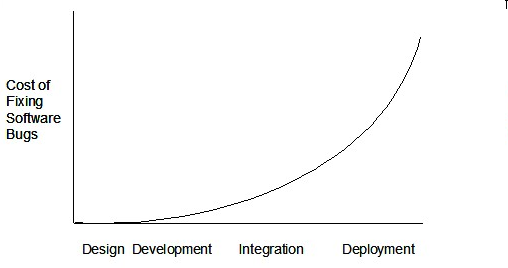
Such early testing of partially developed software is usually, and by necessity, done by the developers themselves i.e. developer testing.
Exercises
implications of developers testing their own code
Discuss pros and cons of developers testing their own code.
Pros:
- Can be done early (the earlier we find a bug, the cheaper it is to fix).
- Can be done at lower levels, for examples, at operation and class level (testers usually test the system at UI level).
- It is possible to do more thorough testing because developers know the expected external behavior as well as the internal structure of the component.
- It forces developers to take responsibility for their own work (they cannot claim that "testing is the job of the testers").
Cons:
- A developer may subconsciously test only situations that he knows to work (i.e. test it too 'gently').
- A developer may be blind to his own mistakes (if he did not consider a certain combination of input while writing code, it is possible for him to miss it again during testing).
- A developer may have misunderstood what the SUT is supposed to do in the first place.
- A developer may lack the testing expertise.
Cost of bug fixing over time
The cost of fixing a bug goes down as we reach the product release.
False. The cost goes up over time.
Why early testing?
Explain why early testing by developers is important.
Can explain exploratory testing and scripted testing
Here are two alternative approaches to testing a software: Scripted testing and Exploratory testing
-
Scripted testing: First write a set of test cases based on the expected behavior of the SUT, and then perform testing based on that set of test cases.
-
Exploratory testing: Devise test cases on-the-fly, creating new test cases based on the results of the past test cases.
Exploratory testing is ‘the simultaneous learning, test design, and test execution’
Here is an example thought process behind a segment of an exploratory testing session:
“Hmm... looks like feature x is broken. This usually means feature n and k could be broken too; we need to look at them soon. But before that, let us give a good test run to feature y because users can still use the product if feature y works, even if x doesn’t work. Now, if feature y doesn’t work 100%, we have a major problem and this has to be made known to the development team sooner rather than later...”
Exploratory testing is also known as reactive testing, error guessing technique, attack-based testing, and bug hunting.
Exploratory Testing Explained, an online article by James Bach -- James Bach is an industry thought leader in software testing).
Exercises
statements about exploratory and scripted testing
Scripted testing requires tests to be written in a scripting language; Manual testing is called exploratory testing.
A) False
Explanation: “Scripted” means test cases are predetermined. They need not be an executable script. However, exploratory testing is usually manual.
Which testing technique is better?
Which testing technique is better?
(e)
Explain the concept of exploratory testing using Minesweeper as an example.
Explain the concept of exploratory testing using Minesweeper as an example.
When we test the Minesweeper by simply playing it in various ways, especially trying out those that are likely to be buggy, that would be exploratory testing.
Can explain the choice between exploratory testing and scripted testing
Which approach is better – scripted or exploratory? A mix is better.
The success of exploratory testing depends on the tester’s prior experience and intuition. Exploratory testing should be done by experienced testers, using a clear strategy/plan/framework. Ad-hoc exploratory testing by unskilled or inexperienced testers without a clear strategy is not recommended for real-world non-trivial systems. While exploratory testing may allow us to detect some problems in a relatively short time, it is not prudent to use exploratory testing as the sole means of testing a critical system.
Scripted testing is more systematic, and hence, likely to discover more bugs given sufficient time, while exploratory testing would aid in quick error discovery, especially if the tester has a lot of experience in testing similar systems.
In some contexts, you will achieve your testing mission better through a more scripted approach; in other contexts, your mission will benefit more from the ability to create and improve tests as you execute them. I find that most situations benefit from a mix of scripted and exploratory approaches. --
[source: bach-et-explained]
Exploratory Testing Explained, an online article by James Bach -- James Bach is an industry thought leader in software testing).
Exercises
Which is better?
Scripted testing is better than exploratory testing.
B) False
Explanation: Each has pros and cons. Relying on only one is not recommended. A combination is better.
Can explain acceptance testing
Acceptance testing (aka User Acceptance Testing (UAT): test the system to ensure it meets the user requirements.
Acceptance tests give an assurance to the customer that the system does what it is intended to do. Acceptance test cases are often defined at the beginning of the project, usually based on the use case specification. Successful completion of UAT is often a prerequisite to the project sign-off.
Can explain the differences between system testing and acceptance testing
Acceptance testing comes after system testing. Similar to system testing, acceptance testing involves testing the whole system.
Some differences between system testing and acceptance testing:
| System Testing | Acceptance Testing |
|---|---|
| Done against the system specification | Done against the requirements specification |
| Done by testers of the project team | Done by a team that represents the customer |
| Done on the development environment or a test bed | Done on the deployment site or on a close simulation of the deployment site |
| Both negative and positive test cases | More focus on positive test cases |
Note: negative test cases: cases where the SUT is not expected to work normally e.g. incorrect inputs; positive test cases: cases where the SUT is expected to work normally
Requirement Specification vs System Specification
The requirement specification need not be the same as the system specification. Some example differences:
| Requirements Specification | System Specification |
|---|---|
| limited to how the system behaves in normal working conditions | can also include details on how it will fail gracefully when pushed beyond limits, how to recover, etc. specification |
| written in terms of problems that need to be solved (e.g. provide a method to locate an email quickly) | written in terms of how the system solve those problems (e.g. explain the email search feature) |
| specifies the interface available for intended end-users | could contain additional APIs not available for end-users (for the use of developers/testers) |
However, in many cases one document serves as both a requirement specification and a system specification.
Passing system tests does not necessarily mean passing acceptance testing. Some examples:
- The system might work on the testbed environments but might not work the same way in the deployment environment, due to subtle differences between the two environments.
- The system might conform to the system specification but could fail to solve the problem it was supposed to solve for the user, due to flaws in the system design.
Exercises
Statements about system testing and acceptance testing.
Choose the correct statements about system testing and acceptance testing.
- a. Both system testing and acceptance testing typically involve the whole system.
- b. System testing is typically more extensive than acceptance testing.
- c. System testing can include testing for non-functional qualities.
- d. Acceptance testing typically has more user involvement than system testing.
- e. In smaller projects, the developers may do system testing as well, in addition to developer testing.
- f. If system testing is adequately done, we need not do acceptance testing.
(a)(b)(c)(d)(e)(f)
Explanation:
(b) is correct because system testing can aim to cover all specified behaviors and can even go beyond the system specification. Therefore, system testing is typically more extensive than acceptance testing.
(f) is incorrect because it is possible for a system to pass system tests but fail acceptance tests.
Can explain regression testing
When we modify a system, the modification may result in some unintended and undesirable effects on the system. Such an effect is called a regression.
Regression testing is the re-testing of the software to detect regressions. Note that to detect regressions, we need to retest all related components, even if they had been tested before.
Regression testing is more effective when it is done frequently, after each small change. However, doing so can be prohibitively expensive if testing is done manually. Hence, regression testing is more practical when it is automated.
Exercises
Regression Testing defintion T/F?
Regression testing is the automated re-testing of a software after it has been modified.
c.
Explanation: Regression testing need not be automated but automation is highly recommended.
Explain regression testing
Explain why and when you would do regression testing in a software project.
Can explain test automation
An automated test case can be run programmatically and the result of the test case (pass or fail) is determined programmatically. Compared to manual testing, automated testing reduces the effort required to run tests repeatedly and increases precision of testing (because manual testing is susceptible to human errors).
Resources
Side readings:
- [Quora post] What is the best way to avoid bugs
- [Quora post] Is automated testing relevant to startups?
Can semi-automate testing of CLIs
A simple way to semi-automate testing of a CLI(Command Line Interface) app is by using input/output re-direction.
- First, we feed the app with a sequence of test inputs that is stored in a file while redirecting the output to another file.
- Next, we compare the actual output file with another file containing the expected output.
Let us assume we are testing a CLI app called AddressBook. Here are the detailed steps:
-
Store the test input in the text file
input.txt.Example
input.txtadd Valid Name p/12345 valid@email.butNoPrefixadd Valid Name 12345 e/valid@email.butPhonePrefixMissing -
Store the output we expect from the SUT in another text file
expected.txt.Example
expected.txtCommand: || [add Valid Name p/12345 valid@email.butNoPrefix]Invalid command format: add Command: || [add Valid Name 12345 e/valid@email.butPhonePrefixMissing]Invalid command format: add -
Run the program as given below, which will redirect the text in
input.txtas the input toAddressBookand similarly, will redirect the output of AddressBook to a text fileoutput.txt. Note that this does not require any code changes toAddressBook.java AddressBook < input.txt > output.txt-
The way to run a CLI program differs based on the language.
e.g., In Python, assuming the code is inAddressBook.pyfile, use the command
python AddressBook.py < input.txt > output.txt -
If you are using Windows, use a normal command window to run the app, not a Power Shell window.
More on the >operator and the<operator extraA CLI program takes input from the keyboard and outputs to the console. That is because those two are default input and output streams, respectively. But you can change that behavior using
<and>operators. For example, if you runAddressBookin a command window, the output will be shown in the console, but if you run it like this,java AddressBook > output.txtthe Operating System then creates a file
output.txtand stores the output in that file instead of displaying it in the console. No file I/O coding is required. Similarly, adding< input.txt(or any other filename) makes the OS redirect the contents of the file as input to the program, as if the user typed the content of the file one line at a time.Resources:
-
-
Next, we compare
output.txtwith theexpected.txt. This can be done using a utility such as WindowsFC(i.e. File Compare) command, Unixdiffcommand, or a GUI tool such as WinMerge.FC output.txt expected.txt
Note that the above technique is only suitable when testing CLI apps, and only if the exact output can be predetermined. If the output varies from one run to the other (e.g. it contains a time stamp), this technique will not work. In those cases we need more sophisticated ways of automating tests.
CLI App: An application that has a Command Line Interface. i.e. user interacts with the app by typing in commands.
Can explain test drivers
A test driver is the code that ‘drives’ the
PayrollTest ‘drives’ the Payroll class by sending it test inputs and verifies if the output is as expected.
public class PayrollTestDriver { public static void main(String[] args) throws Exception { //test setup Payroll p = new Payroll(); //test case 1 p.setEmployees(new String[]{"E001", "E002"}); // automatically verify the response if (p.totalSalary() != 6400) { throw new Error("case 1 failed "); } //test case 2 p.setEmployees(new String[]{"E001"}); if (p.totalSalary() != 2300) { throw new Error("case 2 failed "); } //more tests... System.out.println("All tests passed"); }}Can explain test automation tools
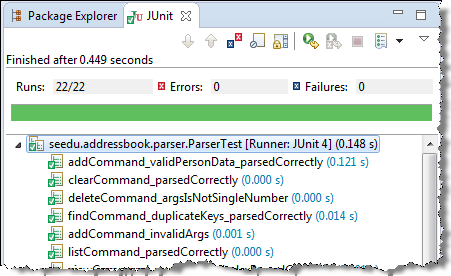
JUnit is a tool for automated testing of Java programs. Similar tools are available for other languages and for automating different types of testing.
This an automated test for a Payroll class, written using JUnit libraries.
@Testpublic void testTotalSalary(){ Payroll p = new Payroll(); //test case 1 p.setEmployees(new String[]{"E001", "E002"}); assertEquals(6400, p.totalSalary()); //test case 2 p.setEmployees(new String[]{"E001"}); assertEquals(2300, p.totalSalary()); //more tests...}Most modern IDEs has integrated support for testing tools. The figure below shows the JUnit output when running some JUnit tests using the Eclipse IDE.
Can explain automated GUI testing
If a software product has a GUI component, all product-level testing (i.e. the types of testing mentioned above) need to be done using the GUI. However, testing the GUI is much harder than testing the CLI (command line interface) or API, for the following reasons:
- Most GUIs can support a large number of different operations, many of which can be performed in any arbitrary order.
- GUI operations are more difficult to automate than API testing. Reliably automating GUI operations and automatically verifying whether the GUI behaves as expected is harder than calling an operation and comparing its return value with an expected value. Therefore, automated regression testing of GUIs is rather difficult.
- The appearance of a GUI (and sometimes even behavior) can be different across platforms and even environments. For example, a GUI can behave differently based on whether it is minimized or maximized, in focus or out of focus, and in a high resolution display or a low resolution display.
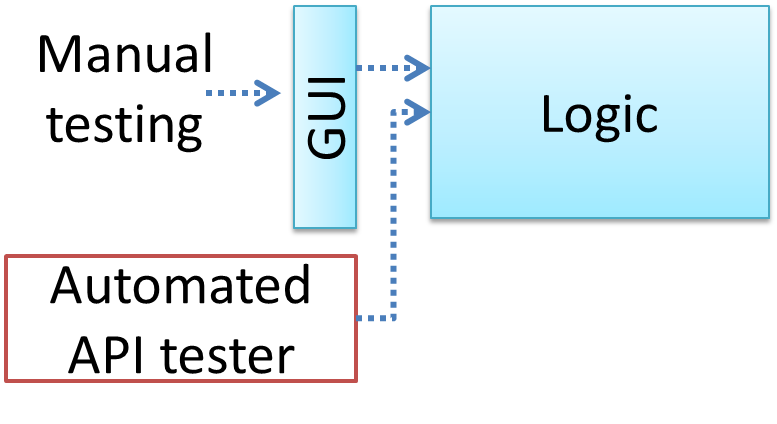
Moving as much logic as possible out of the GUI can make the GUI testing easier. That way, you can bypass the GUI to test the rest of the system using automated API testing. While this still requires the GUI to be tested, the number of such test cases can be reduced as most of the system has been tested using automated API testing.
There are testing tools that can automate GUI testing.
Some tools used for automated GUI testing:
-
TestFx can do automated testing of JavaFX GUIs
-
VisualStudio supports ‘record replay’ type of GUI test automation.
-
Selenium can be used to automate testing of Web application UIs
demo video of automated testing of a Web application
This video shows automated testing of the TEAMMATES Web app using Selenium
Exercises
API testing vs GUI testing
GUI testing is usually easier than API testing because it doesn’t require any extra coding.
False
Can explain test coverage
Test coverage is a metric used to measure the extent to which testing exercises the code i.e., how much of the code is 'covered' by the tests.
Here are some examples of different coverage criteria:
- Function/method coverage : based on functions executed e.g., testing executed 90 out of 100 functions.
- Statement coverage : based on the number of line of code executed e.g., testing executed 23k out of 25k LOC.
- Decision/branch coverage : based on the decision points exercised e.g., an
ifstatement evaluated to bothtrueandfalsewith separate test cases during testing is considered 'covered'. - Condition coverage : based on the boolean sub-expressions, each evaluated to both true and false with different test cases. Condition coverage is not the same as the decision coverage.
if(x > 2 && x < 44) is considered one decision point but two conditions.
For 100% branch or decision coverage, two test cases are required:
(x > 2 && x < 44) == true: [e.g.x == 4](x > 2 && x < 44) == false: [e.g.x == 100]
For 100% condition coverage, three test cases are required
(x > 2) == true,(x < 44) == true: [e.g.x == 4](x < 44) == false: [e.g.x == 100](x > 2) == false: [e.g.x == 0]
- Path coverage measures coverage in terms of possible paths through a given part of the code executed. 100% path coverage means all possible paths have been executed. A commonly used notation for path analysis is called the Control Flow Graph (CFG).
- Entry/exit coverage measures coverage in terms of possible calls to and exits from the operations in the SUT.
Exercises
highest intensity coverage
Which of these gives us the highest intensity of testing?
(b)
Explanation: 100% path coverage implies all possible execution paths through the SUT have been tested. This is essentially ‘exhaustive testing’. While this is very hard to achieve for a non-trivial SUT, it technically gives us the highest intensity of testing. If all tests pass at 100% path coverage, the SUT code can be considered ‘bug free’. However, note that path coverage does not include paths that are missing from the code altogether because the programmer left them out by mistake.
Can explain how test coverage works
Measuring coverage is often done using coverage analysis tools. Most IDEs have inbuilt support for measuring test coverage, or at least have plugins that can measure test coverage.
Coverage analysis can be useful in improving the quality of testing e.g., if a set of test cases does not achieve 100% branch coverage, more test cases can be added to cover missed branches.
Measuring code coverage in Intellij IDEA
Can explain dependency injection
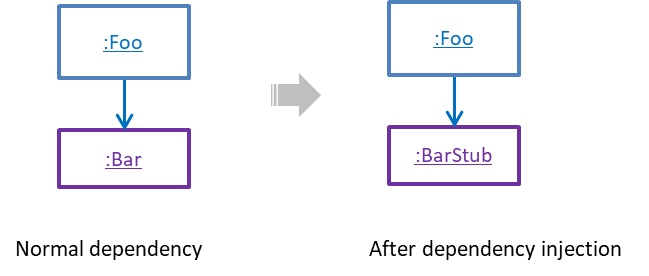
Dependency injection is the process of 'injecting' objects to replace current dependencies with a different object. This is often used to inject
Quality Assurance → Testing → Unit Testing → What →
Quality Assurance → Testing → Unit Testing →
A proper unit test requires the unit to be tested in isolation so that bugs in the
If a Logic class depends on a Storage class, unit testing the Logic class requires isolating the Logic class from
the
Storage class.
Stubs can isolate the
Stub: A stub has the same interface as the component it replaces, but its implementation is so simple that it is unlikely to have any bugs. It mimics the responses of the component, but only for the a limited set of predetermined inputs. That is, it does not know how to respond to any other inputs. Typically, these mimicked responses are hard-coded in the stub rather than computed or retrieved from elsewhere, e.g. from a database.
Consider the code below:
class Logic { Storage s; Logic(Storage s) { this.s = s; } String getName(int index) { return "Name: " + s.getName(index); }}interface Storage { String getName(int index);}class DatabaseStorage implements Storage { @Override public String getName(int index) { return readValueFromDatabase(index); } private String readValueFromDatabase(int index) { // retrieve name from the database }}Normally, you would use the Logic class as follows (note how the Logic object depends on a DatabaseStorage object to perform the getName() operation):
Logic logic = new Logic(new DatabaseStorage());String name = logic.getName(23);You can test it like this:
@Testvoid getName() { Logic logic = new Logic(new DatabaseStorage()); assertEquals("Name: John", logic.getName(5));}However, this logic object being tested is making use of a DataBaseStorage object which means a bug in the DatabaseStorage class can affect the test. Therefore, this test is not testing Logic in isolation from its dependencies and hence it is not a pure unit test.
Here is a stub class you can use in place of DatabaseStorage:
class StorageStub implements Storage { @Override public String getName(int index) { if(index == 5) { return "Adam"; } else { throw new UnsupportedOperationException(); } }}Note how the StorageStub has the same interface as DatabaseStorage, is so simple that it is unlikely to contain bugs, and is pre-configured to respond with a hard-coded response, presumably, the correct response
DatabaseStorage is expected to return for the given test input.
Here is how you can use the stub to write a unit test. This test is not affected by any bugs in the DatabaseStorage class and hence is a pure unit test.
@Testvoid getName() { Logic logic = new Logic(new StorageStub()); assertEquals("Name: Adam", logic.getName(5));}In addition to Stubs, there are other type of replacements you can use during testing. E.g. Mocks, Fakes, Dummies, Spies.
Resources
- Mocks Aren't Stubs by Martin Fowler -- An in-depth article about how Stubs differ from other types of test helpers.
Exercises
Purpose of stubs
Stubs help us to test a component in isolation from its dependencies.
True
A Foo object normally depends on a Bar object, but we can inject a BarStub object so that the Foo object no longer depends
on a Bar object. Now we can test the Foo object in isolation from the Bar object.
Can use dependency injection
Polymorphism can be used to implement dependency injection, as can be seen in the example given in
Quality Assurance → Testing → Unit Testing → What →
Quality Assurance → Testing → Unit Testing →
A proper unit test requires the unit to be tested in isolation so that bugs in the
If a Logic class depends on a Storage class, unit testing the Logic class requires isolating the Logic class from the
Storage class.
Stubs can isolate the
Stub: A stub has the same interface as the component it replaces, but its implementation is so simple that it is unlikely to have any bugs. It mimics the responses of the component, but only for the a limited set of predetermined inputs. That is, it does not know how to respond to any other inputs. Typically, these mimicked responses are hard-coded in the stub rather than computed or retrieved from elsewhere, e.g. from a database.
Consider the code below:
class Logic { Storage s; Logic(Storage s) { this.s = s; } String getName(int index) { return "Name: " + s.getName(index); }}interface Storage { String getName(int index);}class DatabaseStorage implements Storage { @Override public String getName(int index) { return readValueFromDatabase(index); } private String readValueFromDatabase(int index) { // retrieve name from the database }}Normally, you would use the Logic class as follows (note how the Logic object depends on a DatabaseStorage object to perform the getName() operation):
Logic logic = new Logic(new DatabaseStorage());String name = logic.getName(23);You can test it like this:
@Testvoid getName() { Logic logic = new Logic(new DatabaseStorage()); assertEquals("Name: John", logic.getName(5));}However, this logic object being tested is making use of a DataBaseStorage object which means a bug in the DatabaseStorage class can affect the test. Therefore, this test is not testing Logic in isolation from its dependencies and hence it is not a pure unit test.
Here is a stub class you can use in place of DatabaseStorage:
class StorageStub implements Storage { @Override public String getName(int index) { if(index == 5) { return "Adam"; } else { throw new UnsupportedOperationException(); } }}Note how the StorageStub has the same interface as DatabaseStorage, is so simple that it is unlikely to contain bugs, and is pre-configured to respond with a hard-coded response, presumably, the correct response
DatabaseStorage is expected to return for the given test input.
Here is how you can use the stub to write a unit test. This test is not affected by any bugs in the DatabaseStorage class and hence is a pure unit test.
@Testvoid getName() { Logic logic = new Logic(new StorageStub()); assertEquals("Name: Adam", logic.getName(5));}In addition to Stubs, there are other type of replacements you can use during testing. E.g. Mocks, Fakes, Dummies, Spies.
Resources
- Mocks Aren't Stubs by Martin Fowler -- An in-depth article about how Stubs differ from other types of test helpers.
Exercises
Purpose of stubs
Stubs help us to test a component in isolation from its dependencies.
True
Here is another example of using polymorphism to implement dependency injection:
Suppose we want to unit test the Payroll#totalSalary() given below. The method depends on the SalaryManager object to calculate the return value. Note how the setSalaryManager(SalaryManager) can be used to
inject a SalaryManager object to replace the current SalaryManager object.
class Payroll { private SalaryManager manager = new SalaryManager(); private String[] employees; void setEmployees(String[] employees) { this.employees = employees; } void setSalaryManager(SalaryManager sm) { this. manager = sm; } double totalSalary() { double total = 0; for(int i = 0;i < employees.length; i++){ total += manager.getSalaryForEmployee(employees[i]); } return total; }}class SalaryManager { double getSalaryForEmployee(String empID){ //code to access employee’s salary history //code to calculate total salary paid and return it }}During testing, you can inject a SalaryManagerStub object to replace the SalaryManager object.
class PayrollTest { public static void main(String[] args) { //test setup Payroll p = new Payroll(); p.setSalaryManager(new SalaryManagerStub()); //dependency injection //test case 1 p.setEmployees(new String[]{"E001", "E002"}); assertEquals(2500.0, p.totalSalary()); //test case 2 p.setEmployees(new String[]{"E001"}); assertEquals(1000.0, p.totalSalary()); //more tests ... }}class SalaryManagerStub extends SalaryManager { /** Returns hard coded values used for testing */ double getSalaryForEmployee(String empID) { if(empID.equals("E001")) { return 1000.0; } else if(empID.equals("E002")) { return 1500.0; } else { throw new Error("unknown id"); } }}Exercises
statements about dependency injection
Choose correct statement about dependency injection
- a. It is a technique for increasing dependencies
- b. It is useful for unit testing
- c. It can be done using polymorphism
- d. It can be used to substitute a component with a stub
(a)(b)(c)(d)
Explanation: It is a technique we can use to substitute an existing dependency with another, not increase dependencies. It is useful when you want to test a component in isolation but the SUT depends on other components. Using dependency injection, we can substitute those other components with test-friendly stubs. This is often done using polymorphism.
Can explain TDD
Test-Driven Development(TDD)_ advocates writing the tests before writing the SUT, while evolving functionality and tests in small increments. In TDD you first define the precise behavior of the SUT using test cases, and then write the SUT to match the specified behavior. While TDD has its fair share of detractors, there are many who consider it a good way to reduce defects. One big advantage of TDD is that it guarantees the code is testable.
Exercises
When do we write tests in TDD?
A) In TDD, we write all the test cases before we start writing functional code.
B) Testing tools such as Junit require us to follow TDD.
A) False
Explanation: No, not all. We proceed in small steps, writing tests and functional code in tandem, but writing the test before we write the corresponding functional code.
B) False
Explanation: They can be used for TDD, but they can be used without TDD too.
Can follow TDD
Note that TDD does not imply writing all the test cases first before writing functional code. Rather, proceed in small steps:
- Decide what behavior to implement.
- Write test cases to test that behavior.
- Run those test cases and watch them fail.
- Implement the behavior.
- Run the test case.
- Keep modifying the code and rerunning test cases until they all pass.
- Refactor code to improve quality.
- Repeat the cycle for each small unit of behavior that needs to be implemented.